Calculate the price of the object area

Hello! So I just bought QP and started to configure it. I have a problem with calculating the cost of the safety glass.
The price is calculated by square meters. If the glass is square/rectangle then we just multiply the price by square meteres and we get what I need to pay. The problem is with diamond shaped glasses that appear very often on the stairs. On these I do not pay just for the glass area but also for triangles that are cut off - as it is calculated as the waste. For instance: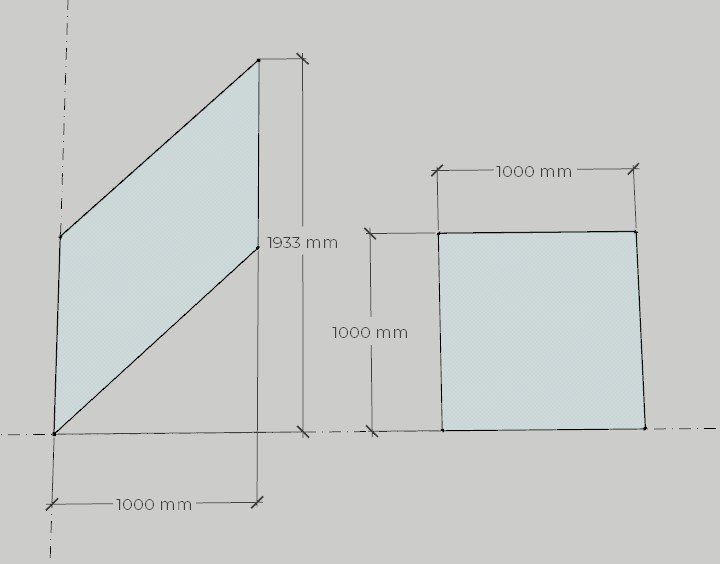
In this case the cost of diamond shaped glass would be: 1m*1,933m*PRICE OF 1m2 = Final cost.
Are there any workarounds? I have similar problem with other elements on the stairs (Im a stair designer) so i need to find a way to do this. Otherwise QP will not make much use to me. Thank you.
-

If you can make the trapezoidal glass pieces a SketchUp component, you can assign Object$ (cost per component) cost data to the piece.
https://support.mindsightstudios.com/hc/en-us/articles/360021190693-Assigning-Cost-and-Weight-Data
You just need to remember to adjust the cost if the shape of the glass panel changes. Unfortunately, it's not a fully automated solution but at least you only need to modify the cost once and it will automatically update the cost of all copies of that panel.
Hope this helps!
Please sign in to leave a comment.
Comments
1 comment